to reset CPAN configuration it is necessary to run this command
perl -e "use CPAN::FirstTime; CPAN::FirstTime::init();"
10/08/2010

9/20/2010
3 ways to reset root password in linux
today I'm gonna to explain how to reset root password in linux. 2 of this ways can be applied only if you have access to PC physically. 3rd way can be applied if your service provider have recovery console or something like that:)
so lets start:
1 EDITING LOADER (in my case it will be GRUB)
boot machine
when the GRUB menu appears, use arrow keys to choose OS to be booted
press letter "e'' on the keyboard to enter edit mode
use arrow keys to select the kernel line for kernel to be booted
press "e" to edit line
go to end of line and type "single" (without quotes) as a separate word
press ESC key to exit the edit mode
press "b" to boot into single user mode
after booting you can set password for root by running passwd commnad
reboot and login with new pw
2. MAGIC WAY :)
If the easy method doesn't work on your machine, another way to solve the "lost root password" problem is to boot your computer from your Linux Installation CD/DVD, or from a live-CD/DVD such as Knoppix.
Boot with the live-disk then go to a terminal and su to root (no password is required) then issue the following commands (be sure to replace each /sda1 with your own root partition device):
Once you are into your system /etc directory, you can use a text editor (vim, nano, pico, etc.) to edit the /etc/shadow file where the password is stored. Various information about root and user accounts is kept in this plain-text file but we are only concerned with the password portion.
For example, the /etc/shadow entry for the "root" account may look something like this:
Now, using your favorite editor (I'll use vim) delete the password hash. For this example, the password is in green text and is all those characters between the 1st and 2nd colons.
After you've edited this field, it should look like this:
Now save the file and change back to the root directory and unmount the system root partition (don't forget to change the /sda1) as follows:
Now reboot the computer.
Once the computer has booted and you're at the login prompt, type "root" and when asked for the password just press ENTER (entering no password). After a successful login, you need to set the new password for root using the following command:
this way was not tested by me and I found it in google :)
3.RECOVERY CONSOLE or LIVE CD/DVD
1.Boot from LIVECD or in RC
2. mount root partition
- if no raid on server than
mount /dev/hda2 /mnt/newroot
- if you have raid
mount /dev/md1 /mnt/newroot
NOTE make sure that you replace hhd name with your own
3. Bind /dev/random from your server
mount –bind /dev /mnt/newroot/dev
4. changing the root file system. (e.g.):
# chroot /mnt/newroot /bin/bash
5.change root password
passwd
6. reboot in normal mode
so lets start:
1 EDITING LOADER (in my case it will be GRUB)
boot machine
when the GRUB menu appears, use arrow keys to choose OS to be booted
press letter "e'' on the keyboard to enter edit mode
use arrow keys to select the kernel line for kernel to be booted
press "e" to edit line
go to end of line and type "single" (without quotes) as a separate word
press ESC key to exit the edit mode
press "b" to boot into single user mode
after booting you can set password for root by running passwd commnad
reboot and login with new pw
2. MAGIC WAY :)
If the easy method doesn't work on your machine, another way to solve the "lost root password" problem is to boot your computer from your Linux Installation CD/DVD, or from a live-CD/DVD such as Knoppix.
Boot with the live-disk then go to a terminal and su to root (no password is required) then issue the following commands (be sure to replace each /sda1 with your own root partition device):
Code:
mount -o dev,rw /mnt/sda1

cd /mnt/sda1/etc
For example, the /etc/shadow entry for the "root" account may look something like this:
Code:
root:$1$aB7mx0Licb$CTbs2RQrfPHkz5Vna0.fnz8H68tB.:10852:0:99999:7:::
Code:
vim shadow
Code:
root::10852:0:99999:7:::
Code:
cd /
umount /mnt/sda1
Once the computer has booted and you're at the login prompt, type "root" and when asked for the password just press ENTER (entering no password). After a successful login, you need to set the new password for root using the following command:
Code:
passwd
3.RECOVERY CONSOLE or LIVE CD/DVD
1.Boot from LIVECD or in RC
2. mount root partition
- if no raid on server than
mount /dev/hda2 /mnt/newroot
- if you have raid
mount /dev/md1 /mnt/newroot
NOTE make sure that you replace hhd name with your own
3. Bind /dev/random from your server
mount –bind /dev /mnt/newroot/dev
4. changing the root file system. (e.g.):
# chroot /mnt/newroot /bin/bash
5.change root password
passwd
6. reboot in normal mode
9/14/2010
installin JDK and JRE gentoo way
had a task to install JDK and JRE on customer server. And when I found that on server Gentoo has been installed it was too late for me :) ( it is my first experience with Gentoo)
so there are the steps
1. update portage
#emerge --sync
2. install JDK/JRE
# emerge virtual/jdk
or
# emerge virtual/jre
3. Configuring JVM
ref http://www.gentoo.org/doc/en/java.xml
so there are the steps
1. update portage
#emerge --sync
2. install JDK/JRE
# emerge virtual/jdk
or
# emerge virtual/jre
3. Configuring JVM
list of java virtual machines
# java-config --list-available-vms
out put should be like:
# java-config --list-available-vms
The following VMs are available for generation-2:
1)      IcedTea6-bin 1.4.1 [icedtea6-bin]
2)      Sun JDK 1.5.0.20 [sun-jdk-1.5] (Build Only)
3) Sun JDK 1.6.0.16 [sun-jdk-1.6]set VM
(By handle (preferred))
# java-config --set-system-vm sun-jdk-1.6
Now using sun-jdk-1.6 as your generation-2 system JVM
(By number)
# java-config --set-system-vm 3
Now using sun-jdk-1.6 as your generation-2 system JVM
ref http://www.gentoo.org/doc/en/java.xml
9/10/2010
Mysql master-master replication
Today I’m going to write a short manual how to create failover mysql cluster.
What we need:
Server1 = master 1/slave2
Server2 = master2/slave2
Internal or external IPs (in this example I will use server1 _ip and server2_ip)
Replication user = replicau
Step-by-step how to:
Step 1.
On server 1 in my.cnf we need to add following lines
[mysqld]
#master config
Server-id =1
Log-bin = mysql-bin
binlog-do-db = test_db
… #we can add as many DB as we need to replicate
#slave config
replicate-do-db = test_db
… #we can add as many DB as we need to replicate
master-host = server2_ip
master-user= replicau
master-password =password_of_user_replicau
master-port = 3306
same lines we should add in my.cnf on server2, the only thing we should change is master-host parameter to use server1_ip instead of server2_ip and change server-id parameter
Step 2
Restart mysql servers
Step 3
On each server we need to create replication user:
Server1
mysql>GRANT REPLICATION SLAVE, REPLICATION CLIENT ON *.* TO 'replicau'@'server2_ip' IDENTIFIED BY 'password';
server2
mysql> GRANT REPLICATION SLAVE, REPLICATION CLIENT ON *.* TO 'replicau'@'server1_ip' IDENTIFIED BY 'password';
Step 4
Add server2 as slave to server1
- we need to set read_only parameter as ON on server1 (master 1)
mysql> SET GLOBAL read_only = ON;
mysql> show master status;
mysql> show master status;
+------------------+----------+--------------+------------------+
| File | Position | Binlog_Do_DB | Binlog_Ignore_DB |
+------------------+----------+--------------+------------------+
| mysql-bin.000006 | 7984 | | |
+------------------+----------+--------------+------------------+
1 row in set (0,00 sec)
on server2
mysql>slave stop;
mysql> CHANGE MASTER TO MASTER_HOST = "server2_ip", MASTER_USER = "replicau", MASTER_PASSWORD = "password_of_user_replication", MASTER_LOG_FILE = "mysql-bin.000006", MASTER_LOG_POS = 7984;
mysql> slave start;
on server1
mysql> SET GLOBAL read_only = OFF;
on server2 check connection status
mysql> show slave status;
if we do not receive any errors, everything is perfect
Step 5
Do Step 4 for connecting server 1 as slave to server2.
Step 6
Check if everything is fine, if no try from step 1
Step 7
It’s time to have a cup of coffee/tea of a bottle of beer
What we need:
Server1 = master 1/slave2
Server2 = master2/slave2
Internal or external IPs (in this example I will use server1 _ip and server2_ip)
Replication user = replicau
Step-by-step how to:
Step 1.
On server 1 in my.cnf we need to add following lines
[mysqld]
#master config
Server-id =1
Log-bin = mysql-bin
binlog-do-db = test_db
… #we can add as many DB as we need to replicate
#slave config
replicate-do-db = test_db
… #we can add as many DB as we need to replicate
master-host = server2_ip
master-user= replicau
master-password =password_of_user_replicau
master-port = 3306
same lines we should add in my.cnf on server2, the only thing we should change is master-host parameter to use server1_ip instead of server2_ip and change server-id parameter
Step 2
Restart mysql servers
Step 3
On each server we need to create replication user:
Server1
mysql>GRANT REPLICATION SLAVE, REPLICATION CLIENT ON *.* TO 'replicau'@'server2_ip' IDENTIFIED BY 'password';
server2
mysql> GRANT REPLICATION SLAVE, REPLICATION CLIENT ON *.* TO 'replicau'@'server1_ip' IDENTIFIED BY 'password';
Step 4
Add server2 as slave to server1
- we need to set read_only parameter as ON on server1 (master 1)
mysql> SET GLOBAL read_only = ON;
mysql> show master status;
mysql> show master status;
+------------------+----------+--------------+------------------+
| File | Position | Binlog_Do_DB | Binlog_Ignore_DB |
+------------------+----------+--------------+------------------+
| mysql-bin.000006 | 7984 | | |
+------------------+----------+--------------+------------------+
1 row in set (0,00 sec)
on server2
mysql>slave stop;
mysql> CHANGE MASTER TO MASTER_HOST = "server2_ip", MASTER_USER = "replicau", MASTER_PASSWORD = "password_of_user_replication", MASTER_LOG_FILE = "mysql-bin.000006", MASTER_LOG_POS = 7984;
mysql> slave start;
on server1
mysql> SET GLOBAL read_only = OFF;
on server2 check connection status
mysql> show slave status;
if we do not receive any errors, everything is perfect
Step 5
Do Step 4 for connecting server 1 as slave to server2.
Step 6
Check if everything is fine, if no try from step 1
Step 7
It’s time to have a cup of coffee/tea of a bottle of beer
9/09/2010
enable snmp windows 7
To install SNMP on Windows 7, open Control Panel and then click on Programs and Features. Then, click on "Turn Windows features on or off" link in the left pane. If UAC prompted, then click on Yes. Then, in the Windows Features window, scroll down and select "Simple Network Management Protocol (SNMP)" check box and click on OK. Then, wait for some time to install SNMP.
After installing SNMP, click on Start Orb and then type Services.msc in the Search box and hit Enter. Then, scroll down in the right pane and right click on SNMP Services and select Properties. Then, click on Traps tab. Now, in the Community Name box, type the community name to which your computer will send trap messages and then click on "Add to list" button. Then, click on Apply and then OK.
After installing SNMP, click on Start Orb and then type Services.msc in the Search box and hit Enter. Then, scroll down in the right pane and right click on SNMP Services and select Properties. Then, click on Traps tab. Now, in the Community Name box, type the community name to which your computer will send trap messages and then click on "Add to list" button. Then, click on Apply and then OK.
8/19/2010
7/12/2010
6/26/2010
Remove IP from Real time Blacklist
AOL:
Request whitelist – http://postmaster.info.aol.com/whitelist/whitelist_guides.html
Remove from RBL – http://postmaster.info.aol.com/waters/sa_form.html
Hotmail:
Remove from RBL – http://ipremoval.sms.symantec.com/lookup/
Yahoo!:
Request whitelist – http://help.yahoo.com/l/us/yahoo/mail/postmaster/postmaster_wl.html?from_url=http://help.yahoo.com/l/us/yahoo/mail/postmaster/index.html
Remove from RBL – http://help.yahoo.com/l/us/yahoo/mail/postmaster/defer.html?from_url=http://help.yahoo.com/l/us/yahoo/mail/postmaster/index.html
6/23/2010
add repos into suse
recently I had a problem with adding repos into Suse. Unfortunately Google said that it is easy, but for newbie lime me it was very difficult :)
but finally I find the way how to add repos so
1. find link to repo
I suppose that this link will be very useful http://en.opensuse.org/Additional_package_repositories
2 in console please run this command
that's all :)
but finally I find the way how to add repos so
1. find link to repo
I suppose that this link will be very useful http://en.opensuse.org/Additional_package_repositories
2 in console please run this command
# zypper ar URL alias
URL- from 1.
Alias - type whatever you want
that's all :)
6/22/2010
How to Install FFmpeg in Linux ~centos way~
FFmpeg is so important if you are planning to run a video website with streaming with conversion of video files to different video formats. This tutorial is intended for Centos/Redhat versions of Linux where any novice user can install ffmpeg without compiling the source which is a more traditional way of installing the FFmpeg software on linux servers. In this tutorial i will show you the easy way to install ffmpeg and ffmpeg-php (php extension) with just yum rather than compiling ffmpeg from source files.
FFmpeg (http://ffmpeg.mplayerhq.hu)
Mplayer + Mencoder (http://www.mplayerhq.hu/design7/dload.html)
Flv2tool (http://inlet-media.de/flvtool2)
Libogg + Libvorbis (http://www.xiph.org/downloads)
LAME MP3 Encoder (http://lame.sourceforge.net)
FlowPlayer - A Free Flash Video Player - http://flowplayer.org/
Installing FFMpeg
yum install ffmpeg ffmpeg-devel
If you get package not found, then you will need to add few lines in the yum repository for dag packages installation. Create a file named dag.repo in /etc/yum.repos.d with the following contents on it
[dag]
name=Dag RPM Repository for Red Hat Enterprise Linux
baseurl=http://apt.sw.be/redhat/el$releasever/en/$basearch/dag
gpgcheck=1
enabled=1
then
yum install ffmpeg ffmpeg-devel
If everything is fine, then the installation should proceed smoothly. If not you will get something like warning GPG public key missing .
Common Errors
To fix rpmforge GPG key warning:
rpm -Uhv http://apt.sw.be/redhat/el5/en/i386/rpmforge/RPMS/rpmforge-release-0.3.6-1.el5.rf.i386.rpm
For more information refer to this faq depending on Centos version
Missing Dependency Error:
If you get missing dependency error like shown below, in the middle of ffmpeg installation
Error: Missing Dependency: libc.so.6(GLIBC_2.4) is needed by package ffmpeg
Error: Missing Dependency: libtheora.so.0(libtheora.so.1.0) is needed by package ffmpeg
Error: Missing Dependency: rtld(GNU_HASH) is needed by package ffmpeg
Error: Missing Dependency: libc.so.6(GLIBC_2.4) is needed by package imlib2
Error: Missing Dependency: rtld(GNU_HASH) is needed by package a52dec
Error: Missing Dependency: rtld(GNU_HASH) is needed by package imlib2
Error: Missing Dependency: rtld(GNU_HASH) is needed by package gsm
Error: Missing Dependency: libc.so.6(GLIBC_2.4) is needed by package x264
Error: Missing Dependency: rtld(GNU_HASH) is needed by package xvidcore
Error: Missing Dependency: libc.so.6(GLIBC_2.4) is needed by package lame
Error: Missing Dependency: libc.so.6(GLIBC_2.4) is needed by package a52dec
Error: Missing Dependency: rtld(GNU_HASH) is needed by package faad2
Error: Missing Dependency: rtld(GNU_HASH) is needed by package x264
Error: Missing Dependency: rtld(GNU_HASH) is needed by package lame
Error: Missing Dependency: libc.so.6(GLIBC_2.4) is needed by package xvidcore
Error: Missing Dependency: libc.so.6(GLIBC_2.4) is needed by package faac
Error: Missing Dependency: libc.so.6(GLIBC_2.4) is needed by package faad2
Error: Missing Dependency: libgif.so.4 is needed by package imlib2
Error: Missing Dependency: rtld(GNU_HASH) is needed by package faac
Error: Missing Dependency: libc.so.6(GLIBC_2.4) is needed by package gsm
Error: Missing Dependency: libpng12.so.0(PNG12_0) is needed by package imlib2
Error: Missing Dependency: rtld(GNU_HASH) is needed by package libmp4v2
Error: Missing Dependency: libc.so.6(GLIBC_2.4) is needed by package libmp4v2
then most commonly you have GLIB 2.3 installed instead of GLIB 2.4 version. To check the current GLIB version installed on your server. just use
yum list glib*
and it should list the latest GLIB package version.
The reason i was getting this error was my rpmforge packages was pointed to centos 5 versions instead of centos 4.6.
To fix dependency error:
To fix this error, you might need to check your rpmforge packages compatible to the release of your existing CentOS version.
Check the file /etc/yum.repos.d/rpmforge.repo and it should look like for Centos 4.6(Final). If you have lines like http://apt.sw.be/redhat/el5/en/mirrors-rpmforge you might need to make changes to the rpmforge.repos like shown below
Note: Backup the original rpmforge.repo file before you edit its content.
[rpmforge]
name = Red Hat Enterprise $releasever - RPMforge.net - dag
#baseurl = http://apt.sw.be/redhat/el4/en/$basearch/dag
mirrorlist = http://apt.sw.be/redhat/el4/en/mirrors-rpmforge
#mirrorlist = file:///etc/yum.repos.d/mirrors-rpmforge
enabled = 1
protect = 0
gpgkey = file:///etc/pki/rpm-gpg/RPM-GPG-KEY-rpmforge-dag
gpgcheck = 1
To know what linux type and version you are running
cat /etc/redhat-release
Once this is done, do again yum install ffmpeg.
This trick resolved the problem in my linux box running Centos 4.6 and this is the only way i found to install ffmpeg using yum.
To check the FFmpeg working:
Finally, check the ffmpeg whether it is working or not.
> ffmpeg
> ffmpeg -formats
> ffmpeg --help
// This lists path of mpeg, its modules and other path information
ffmpeg -i Input.file Output.file
To check what audi/video formats are supported
ffmpeg -formats > ffmpeg-format.txt
Open the ffmpeg-formats.txt to see the ooutput
D means decode
E means encode
V means video
A means audio
T = Truncated
Install FFMPEG-PHP Extension
FFmpeg-php is a very good extension and wrapper for PHP which can pull useful information about video through API interface. Inorder to install it you will need to download the source file and then compile and install extension in your server. You can download the source tarball : http://ffmpeg-php.sourceforge.net/
wget http://sourceforge.net/projects/ffmpeg-php/files/ffmpeg-php/0.6.0/ffmpeg-php-0.6.0.tbz2/download
tar xf ffmpeg-php-0.6.0.tbz2
cd ffmpeg-php-0.6.0
phpize
./configure && make && make install
echo 'extension=ffmpeg.so' > /etc/php5/conf.d/ffmpeg.ini
php -i |grep -i ffmpeg
Ensure it shows ffmpeg extension. Restart apache to let PHP use it too
/etc/init.d/apache2 restart
P.S.
On Suse 11 I have met compilation problem (PIX_FMT_RGBA32 undeclared ). It has been described here:
http://ubuntuforums.org/showthread.php?t=902247
I repeat solution:
vi ffmpeg_frame.c
:%s/PIX_FMT_RGBA32/PIX_FMT_RGB32
:wq
Common Errors
1. If you get command not found error for phpize, then you will need to do yum install php-devel
2. If you get error like "ffmpeg headers not found" while configuring the source.
configure: error: ffmpeg headers not found. Make sure ffmpeg is compiled as shared libraries using the --enable-shared option
then it means you have not installed ffmpeg-devel packages.
To Fix: Just install ffmpeg-devel using
yum install ffmpeg-devel
3. If you get an error like shared libraries not found problem and the program halts in the middle, then you must specify the ffmpeg installed path explicitly to the ./configure.
configure: error: ffmpeg shared libraries not found. Make sure ffmpeg is compiled as shared libraries using the --enable-shared option
To Fix:
1. First find out the ffmpeg path with ffmpeg --help command. The prefix default path should be like /usr/local/cpffmpeg
2. Configure the FFmpeg-php with --with-ffmpeg option
./configure --with-ffmpeg=/usr/local/cpffmpeg
That should resolve the problem!
Editing PHP.INI
Once you have done that without any problems then you will see the php extension file /usr/local/lib/php/extensions/no-debug-non-zts-20060613/ffmpeg.so and you will need mention that extension in php.ini file
nano /usr/local/lib/php.ini
Put the below two lines at the end of the php.ini file
[ffmpeg]
extension=ffmpeg.so
Then restart the server service httpd restart
To check whether ffmpeg enabled with php, point your browser to test.php file. It should show the confirmation of installed ffmpeg php extension
// #test.php
<?php
phpinfo()
?>
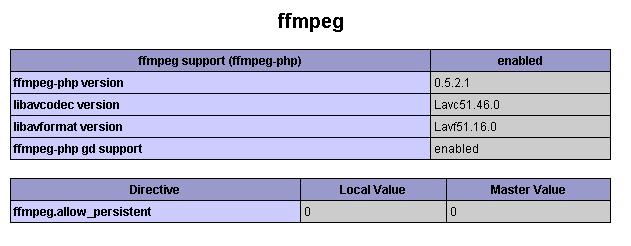
If any case the ffmpeg does not show in the phpinfo() test make sure that php.ini path to ffmpeg.so is correct. Still the problem occurs, the reason could be you might be using older versions of ffmpeg-php which is buggy. Just download the latest version of ffmpeg-php source then compile it.
Installing Mplayer + Mencoder
Just issue the following yum commands to install the rest of the packages.
yum install mplayer mencoder
Installing FlvTool2
Flvtool2 is a flash video file manipulation tool. It can calculate metadata and can cut and edit cue points for flv files.
If you are on Centos 5 try yum install flvtool2 with dag repository and if you get package not found you will need to manually download and compile the flvtool2. You can download latest version of flvtool2 here: http://rubyforge.org/projects/flvtool2/
wget <url-link>
ruby setup.rb config
ruby setup.rb setup
sudo ruby setup.rb install
If you get command not found error, it probably means that you dont have ruby installed.
yum install ruby
Thats it! Once ffmpeg works fine with php extension, download a sample video, convert to .flv format in the command line and plug it to flowplayer to see it work on your web browser. Try also to download the video file offline and see whether the converted flv file works well with both audio and video.
Subscribe to:
Posts (Atom)